Chapter 12
The checks column and check details
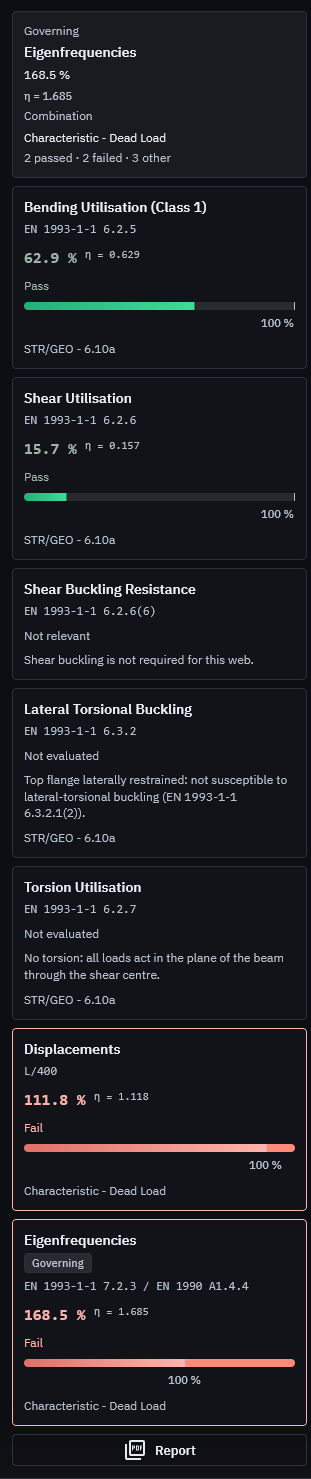
The checks column tells you whether the beam passes its Eurocode verifications. Each check is a card with the engine's utilisation and verdict, and a summary above the cards names the governing check. Open a card and you see how the result was reached: the governing combination, the equations with your numbers and every value used. The derivation on screen is the same one the PDF report prints. Statiko shows the engine's numbers and verdicts; the column itself decides nothing.
Where the checks are
In a large desktop window the checks sit in a 320 dp column on the right of the workspace. In an expanded window they follow the graphs in the scrolling centre column as a grid of cards, at least 220 dp wide each. In compact and medium windows the list shows alone, and a card opens its check full width with the Checks back button. On a phone they are in the Checks tab (see Chapter 4).
At the end of the column the Report button opens the PDF export (see Chapter 14). It is enabled for current and outdated results; otherwise it is disabled with “No current result is available for a report. Calculate first.”
Source: spec/beam/checks-column.md rules 21, 22.
Which checks are listed
The list depends on the material and never changes length: the same cards appear while calculating, when current, outdated or failed, so nothing jumps around as you edit.
| Steel | Timber and glulam |
|---|---|
| Bending Utilisation (Class n) · EN 1993-1-1 6.2.5 | Bending · EN 1995-1-1 6.1.6 |
| Shear Utilisation · EN 1993-1-1 6.2.6 | Shear · EN 1995-1-1 6.1.7 |
| Shear Buckling Resistance · EN 1993-1-1 6.2.6(6) | Bearing · EN 1995-1-1 6.1.5 |
| Lateral Torsional Buckling · EN 1993-1-1 6.3.2 | Torsion · EN 1995-1-1 6.1.8 |
| Torsion Utilisation · EN 1993-1-1 6.2.7 | Lateral Torsional Buckling · EN 1995-1-1 6.3.3 |
| Displacements | Displacements (uinst and ufin in one card) |
| Eigenfrequencies · EN 1993-1-1 7.2.3 / EN 1990 A1.4.4 | Eigenfrequencies · EN 1995-1-1 7.3.3 / EN 1990 A1.4.4 |
There is no separate bending-and-shear card for steel: the high-shear interaction is the last row of the opened Bending check. A timber or glulam beam with fire input adds Fire verification at the end (see Chapter 13). Concrete beams have their own list, described in Chapter 7 and Chapter 20.
Torsion is always listed. Without torsion it reads Not evaluated with “No torsion: all loads act in the plane of the beam through the shear centre.” Shear Buckling Resistance reads Not relevant when the web does not need it. Lateral Torsional Buckling reads Not evaluated only when the engine gives a reason, such as a declared top flange restraint (see Chapter 8).
Source: spec/beam/checks-column.md rules 1–6; clauses from resources notation BeamCheckNotation.kt.
Reading a check card
Each card shows the check's title and clause, the utilisation as a percentage with one decimal and the ratio η beside it, for example 86.2 % and η = 0.862, and the verdict word Pass or Fail.
The bar under the numbers has a marker at 100 %. A passing fill runs green up to the value; a failing fill is red and grows stronger past the marker. Above 100 % the scale stretches so the marker stays inside the card. Green and red appear only with a real Pass or Fail, and always with the word.
The steel and timber Lateral Torsional Buckling cards also show Mcr for the check's governing combination; Bending and LTB cards show the warping moment Mw,Ed and the minor-axis moment Mz,Ed when the engine reports them.
The governing summary
Above the cards a line counts the results, “<n> passed · <n> failed · <n> other”, and names the governing check with its combination. The governing check is the evaluated check with the greatest utilisation, and its card carries the Governing mark. It can be an SLS check such as Eigenfrequencies. While calculating, the summary shows “Calculating…” and no verdict.
Every check is verified over all of this beam's combinations, whichever combination the Load combinations card shows. With None selected the cards show the same governing results as with any combination selected; only the graphs change, and the Moment graph then shows no Mcr.
Source: spec/beam/checks-column.md rules 7–13, 19.
When a check has no ratio
Statiko keeps every kind of “no result” distinct, so a missing check is never mistaken for a pass.
| Status | What the card shows |
|---|---|
| Unsupported | Neutral, no ratio or bar, the reason, e.g. “The web slenderness requires a shear buckling check (EN 1993-1-5 section 5), which is outside the supported scope.” |
| Unavailable | Neutral with its reason, e.g. “Mode 1 natural frequency is not available.” |
| Invalid input | Warning colour, no ratio |
| Failed calculation | Error colour, no ratio |
| Not evaluated / Not relevant | Neutral with a one-sentence reason; counted under “other”, never as a pass |
| Outdated | “Outdated”, the previous ratio dimmed, no green |
| Calculating, first run | The real cards with placeholder values and an empty bar |
Other reasons you may meet include “Support B has no bearing length.” (naming the support), “The beam carries an axial force; the beam checks cover beams without axial force.”, “Statiko does not cover the Swedish National Annex crack factor for timber shear.” and “No load combination applies to this check.” When the whole analysis has failed or is unsupported, every card shows that sentence instead of a ratio.
Source: spec/beam/checks-column.md rules 14–18 and Strings.
Opening a check
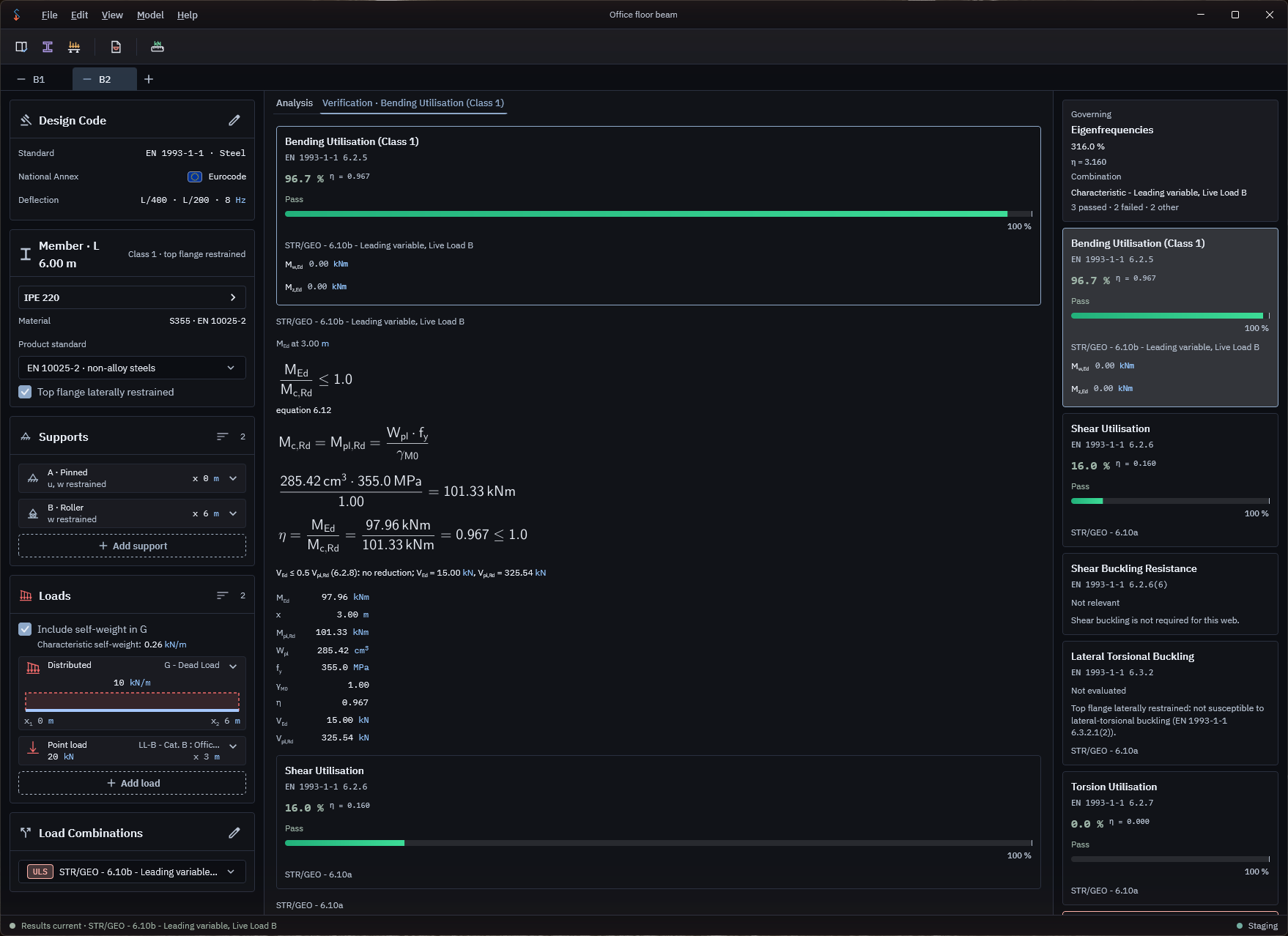
Click a card to open its derivation. On desktop and tablets two tabs sit over the centre, Analysis and Verification. The card opens under Verification, named Verification · <check>; the drawing and graphs wait under Analysis. The Verification view lists every check of the beam in the list's order, each as its compact card followed by its derivation, and scrolls to the one you clicked. The checks column stays in place with the opened card outlined. With nothing opened, Verification reads “Choose a check to see its derivation.” Click the Analysis tab to go back.
On a phone the card opens full width with a Checks back button above the title; Android Back closes the check before leaving the workspace.
Source: spec/beam/check-details.md rules 1–4, 25.
What the derivation shows
From top to bottom an opened check shows:
- the title, clause, utilisation, verdict word and bar, exactly as on the card;
- the governing combination, with the governing position where the engine gives one, for example “MEd at 2.40 m”; a section check without a combination says so, for example “Section check for IPE 220. No load combination.”;
- for a concrete Bending + or Bending − check, the flexure figure of the report: the section, the strain and stress diagrams and the detail of the compression zone, with x, the stress block and the forces Cc, Cs and Ts; in a narrow view it scrolls sideways;
- the derivation steps: the governing inequality with its equation number, the resistance formula, the formula with your values substituted, and the utilisation line;
- the value rows, a tight table of symbol and value with unit.
The equations are those of the method the engine used. Steel Bending uses Wpl, Wel,min or Weff according to the section class, and ends with the high-shear row: VEd, Vpl,Rd, ρ and My,V,Rd when the reduction applies, or “VEd ≤ 0.5 Vpl,Rd (6.2.8): no reduction”. Lateral Torsional Buckling shows Mcr, αLT, λ̄LT, ΦLT, χLT and Mb,Rd with γM1. Eigenfrequencies shows f1, flim (“limit from project settings”), the mass basis and η = flim / f1. Timber Bending begins with Service Class and Shortest load duration, the two inputs that set kmod, then σm,y,d and fm,d. The methods themselves are explained in Chapter 18 and Chapter 19.
Every number comes from the engine result or your inputs; the screen only formats it. A value the engine does not give reads Unavailable. Unsupported, invalid and failed checks show only the verdict word and the reason, with no equations. While the first calculation runs, the view reads “Equation values are not available until a calculation finishes.”; when outdated, the previous derivation stays with the Outdated word.
Source: spec/beam/check-details.md rules 5–11, 14–21, 23, 24.